First steps
I created a specification document where I defined what to audit and how to present the results. This file serves as a checklist and methodology for the AI agent.
Aspects I decided to audit:
Colors: Brand palette, text colors, links, backgrounds, and borders (frequency of use and detection of loose vs. tokenized values).
Typography: Families, weights, actual scale with sizing, and line height.
Spacing: Most frequent paddings, margins, gaps, and border radii; container widths and layout patterns.
Buttons: Actual variants, styles, states, and usage context.
Shadows and gradients: Applied box-shadow values and gradients.
Iconography: Icon system, sizes, colors, and accessibility issues.
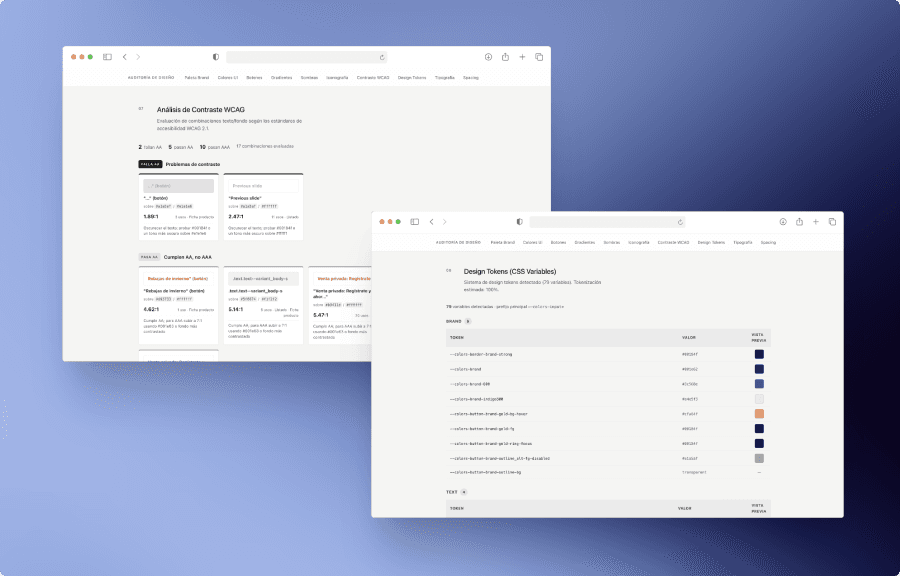
WCAG Accessibility: Text/background contrast with actual ratios, AA/AAA ratings, and suggested fixes.
Design tokens: CSS variables grouped by category with visual previews.
Implementation
A standard practice of mine in AI projects is to set rules in Cursor: I instruct the agent to explain everything in non-technical language, refrain from making visual decisions without my input, and, if something fails, describe the issue based on what is visible on the screen. As a UX designer, I need to understand what is happening in order to make informed decisions. Then, I installed the Playwright MCP in Cursor, which allows the agent to control a real browser and extract styles.
With the brief and tools ready, I asked the agent for an execution plan:
Initialize the project: (Node, TypeScript, Playwright)
Navigate: Visit the ASICS home, PLP, and PDP.
Extract: Capture computed styles and CSS variables.
Analyze: Process the data across 11 report sections.
Generate: Create a self-contained static HTML file.
Publish: Publish the result.
I worked iteratively on the report's webpage. I wanted each section to include visual previews. The final step was to publish the report so it could be shared: https://auditoria-diseno-asics.vercel.app