BACK
Journeys Design System
Journeys Design System
Journeys Design System
DATE:
2024 -2025
|
ROL:
Design System Specialist
ABOUT THE PROJETC
Journeys is a design system built for products in the tourism sector. Its goal is to connect two products with different needs: a camping network app in Spain (focused on managing stays, activities, and events) and a platform for apartment registration and management.
Journeys is a design system built for products in the tourism sector. Its goal is to connect two products with different needs: a camping network app in Spain (focused on managing stays, activities, and events) and a platform for apartment registration and management.

FIRST STEPS
FIRST STEPS
The first step was to analyze the company's ecosystem, a tourism business that had been developing its products in isolation through external teams. This fragmentation created the need to unify components in order to ensure visual consistency and technical scalability.
To tackle this challenge, I proposed starting with a UI inventory, collecting and documenting all existing components and design patterns. This process provided a clear picture of the products' current state, helped identify inconsistencies, and laid the solid foundation needed to build the system.
The first step was to analyze the company's ecosystem, a tourism business that had been developing its products in isolation through external teams. This fragmentation created the need to unify components in order to ensure visual consistency and technical scalability.
To tackle this challenge, I proposed starting with a UI inventory, collecting and documenting all existing components and design patterns. This process provided a clear picture of the products' current state, helped identify inconsistencies, and laid the solid foundation needed to build the system.
THE CORE CHALLENGE: TWO BRANDS, ONE FOUNDATION
THE CORE CHALLENGE: TWO BRANDS, ONE FOUNDATION
The real challenge wasn't just building a design system, but creating one that worked for two visually opposite products. The camping app required a warm, natural identity with friendly typography, while the property management platform demanded a corporate, clean, and functional aesthetic for daily professional use. The risk was ending up with two separate systems, doubling maintenance and losing the efficiency of a common foundation.
To solve this, I proposed separating the architecture into two layers: a shared foundations layer (taxonomy, spacing, breakpoints, and component logic) and an independent identity layer per brand, implemented via Figma color modes. This allowed a single component to exist once while adapting visually to each brand.
The real challenge wasn't just building a design system, but creating one that worked for two visually opposite products. The camping app required a warm, natural identity with friendly typography, while the property management platform demanded a corporate, clean, and functional aesthetic for daily professional use. The risk was ending up with two separate systems, doubling maintenance and losing the efficiency of a common foundation.
To solve this, I proposed separating the architecture into two layers: a shared foundations layer (taxonomy, spacing, breakpoints, and component logic) and an independent identity layer per brand, implemented via Figma color modes. This allowed a single component to exist once while adapting visually to each brand.
Foundations
DESIGN TOKEN TAXONOMY
DESIGN TOKEN TAXONOMY
A clear and well-structured taxonomy for design tokens was developed to serve as a common language for the entire system. We based it on the methodology proposed by Nathan Curtis, adapting it to the specific needs of the project and the team’s technical capabilities. This made it possible to create a flexible and practical structure, facilitating the management of colors, typography, spacing, and other visual attributes.
A clear and well-structured taxonomy for design tokens was developed to serve as a common language for the entire system. We based it on the methodology proposed by Nathan Curtis, adapting it to the specific needs of the project and the team’s technical capabilities. This made it possible to create a flexible and practical structure, facilitating the management of colors, typography, spacing, and other visual attributes.

COLORS
COLORS
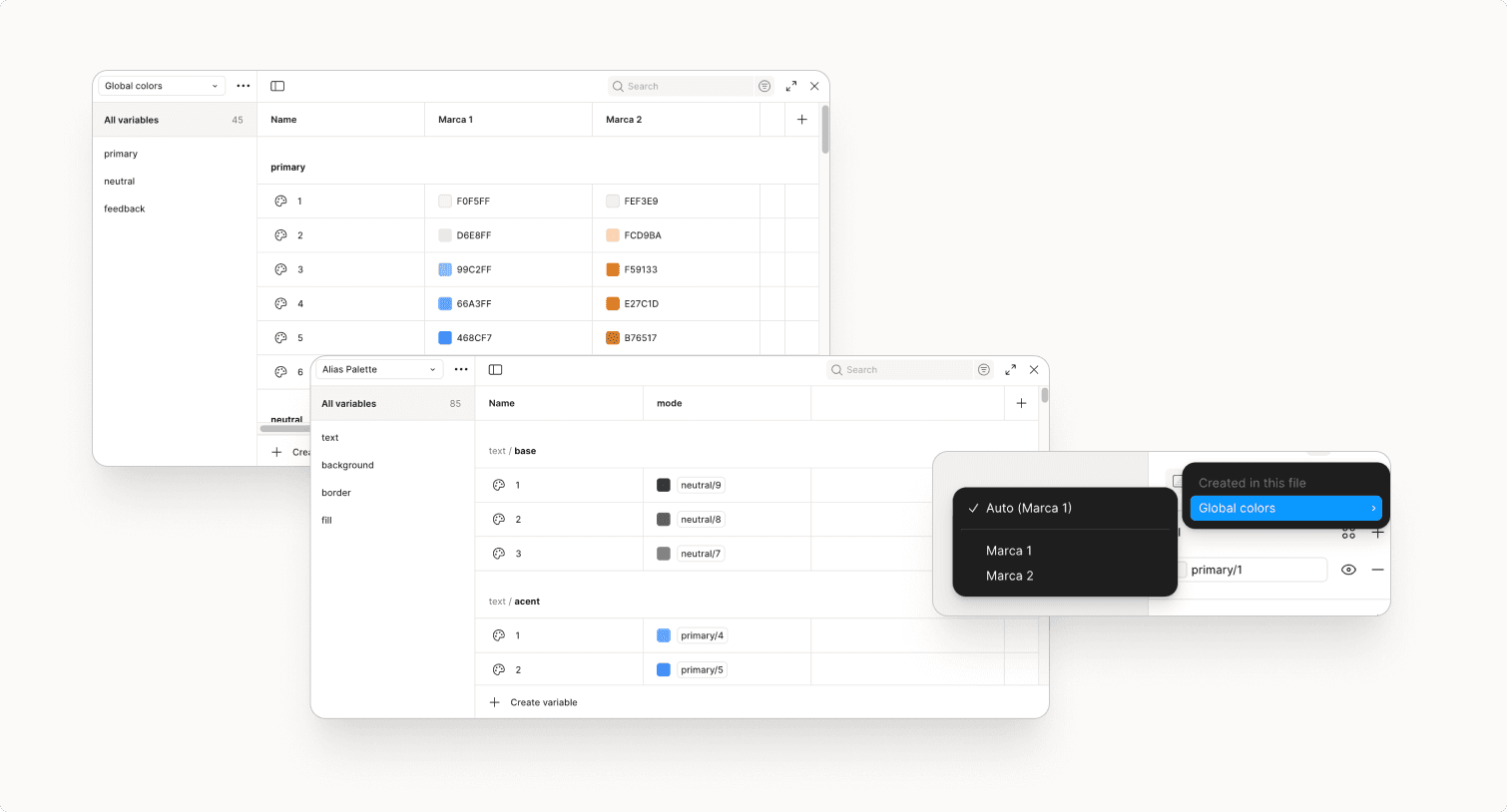
Color palettes were defined, including primary, base, and feedback colors, among others. For the primary colors, two main palettes corresponding to each brand were used, implemented through color modes in Figma. This setup facilitates the reuse of the same components across different visual identities. To organize the colors, two collections were created in Figma:
Globals: Groups general categories (primary, base, feedback) that serve a global function in the design.
Alias: Assigns a specific and semantic use to each color, defining its exact application within the interface.
Color palettes were defined, including primary, base, and feedback colors, among others. For the primary colors, two main palettes corresponding to each brand were used, implemented through color modes in Figma. This setup facilitates the reuse of the same components across different visual identities. To organize the colors, two collections were created in Figma:
Globals: Groups general categories (primary, base, feedback) that serve a global function in the design.
Alias: Assigns a specific and semantic use to each color, defining its exact application within the interface.
Color palettes were defined, including primary, base, and feedback colors, among others. For the primary colors, two main palettes corresponding to each brand were used, implemented through color modes in Figma. This setup facilitates the reuse of the same components across different visual identities. To organize the colors, two collections were created in Figma:
Globals: Groups general categories (primary, base, feedback) that serve a global function in the design.
Alias: Assigns a specific and semantic use to each color, defining its exact application within the interface.

TYPOGRAPHY
TYPOGRAPHY
Tokens were defined for the various typographic attributes: font family, sizes, weights, line height, and letter spacing. These act as independent variables that ensure consistency across the entire system. Since Figma does not yet support composite typography variables, once these tokens were created, specific text styles were defined by combining them.
Text styles are named semantically to make them easier to use (title, body, caption, or link), each with size and weight variations tailored to its specific function.
Tokens were defined for the various typographic attributes: font family, sizes, weights, line height, and letter spacing. These act as independent variables that ensure consistency across the entire system. Since Figma does not yet support composite typography variables, once these tokens were created, specific text styles were defined by combining them.
Text styles are named semantically to make them easier to use (title, body, caption, or link), each with size and weight variations tailored to its specific function.


SPACING AND BREAKPOINTS
SPACING AND BREAKPOINTS
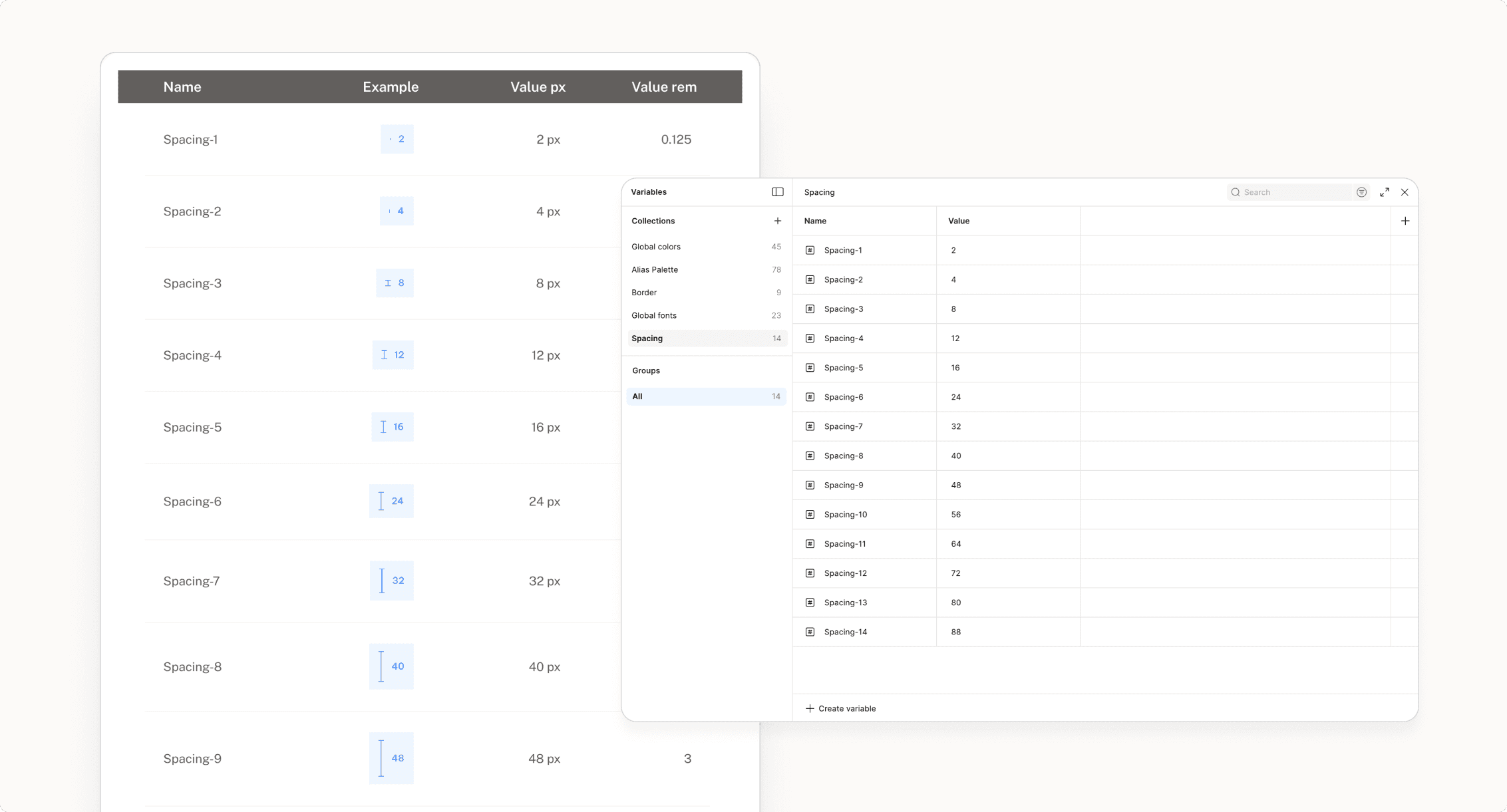
A spacing system based on an 8px grid was defined. Some intermediate multiples, such as 4px and 12px, were included to provide greater flexibility in layout composition and allow for more precise adjustments when needed.
Additionally, key breakpoints were established to ensure the design adapts to different screen sizes, guaranteeing an optimal and consistent experience across mobile, tablet, and desktop devices.
A spacing system based on an 8px grid was defined. Some intermediate multiples, such as 4px and 12px, were included to provide greater flexibility in layout composition and allow for more precise adjustments when needed.
Additionally, key breakpoints were established to ensure the design adapts to different screen sizes, guaranteeing an optimal and consistent experience across mobile, tablet, and desktop devices.

ICONS
ICONS
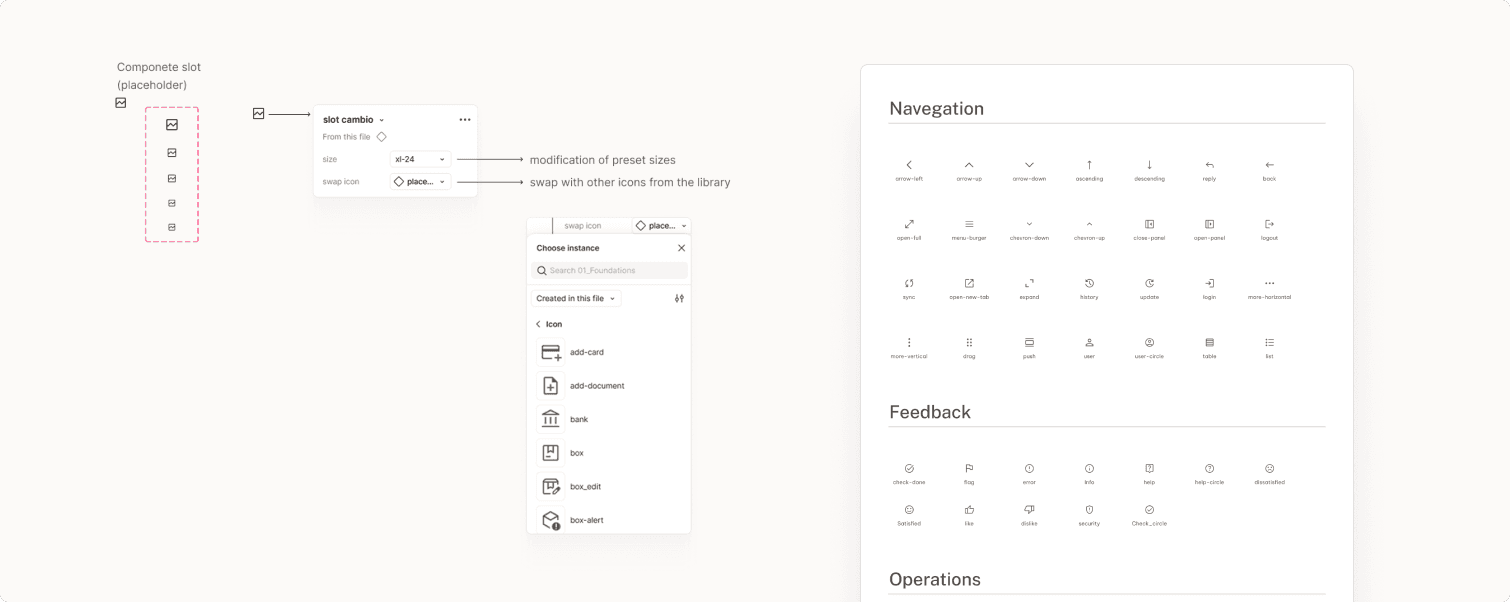
Five general icon sizes were standardized to maintain visual consistency across all interfaces. Together with the team, we agreed to use the Material Icons library, as it best fit the project’s needs and offered a wide variety of assets.
To optimize management and usage, we developed a Figma library based on slots, allowing both icon instances and sizes to be swapped easily and efficiently.
Five general icon sizes were standardized to maintain visual consistency across all interfaces. Together with the team, we agreed to use the Material Icons library, as it best fit the project’s needs and offered a wide variety of assets.
To optimize management and usage, we developed a Figma library based on slots, allowing both icon instances and sizes to be swapped easily and efficiently.
Components
COMPONENT PRIORITIZATION
COMPONENT PRIORITIZATION
When planning the system, I proposed prioritizing the development of the most frequently used components to ensure a solid foundation before moving on to more complex elements. We started with essentials such as buttons, inputs, checkboxes, and dropdowns.
This approach ensured consistency in interaction patterns from the early stages and enabled the team to build functional screens more quickly, optimizing both design and development timelines.
When planning the system, I proposed prioritizing the development of the most frequently used components to ensure a solid foundation before moving on to more complex elements. We started with essentials such as buttons, inputs, checkboxes, and dropdowns.
This approach ensured consistency in interaction patterns from the early stages and enabled the team to build functional screens more quickly, optimizing both design and development timelines.
LIBRARY ORGANIZATION
LIBRARY ORGANIZATION
We defined a modular architecture using multiple libraries to optimize maintenance and scalability. The Foundations Library centralizes all styles and variables, acting as the system's "single source of truth." Meanwhile, the Component Libraries directly consume these styles, significantly reducing maintenance effort.
We defined a modular architecture using multiple libraries to optimize maintenance and scalability. The Foundations Library centralizes all styles and variables, acting as the system's "single source of truth." Meanwhile, the Component Libraries directly consume these styles, significantly reducing maintenance effort.

COMPONENT DEVELOPMENT
COMPONENT DEVELOPMENT
To avoid overloading a single canvas in Figma, we distributed component development across different pages. Each component includes detailed information regarding its intended use, types, variants, and states. Additionally, a direct link to the documentation and development handoff is provided to eliminate ambiguity during implementation.
To avoid overloading a single canvas in Figma, we distributed component development across different pages. Each component includes detailed information regarding its intended use, types, variants, and states. Additionally, a direct link to the documentation and development handoff is provided to eliminate ambiguity during implementation.
Documentation & Handoff
DOCUMENTATION
DOCUMENTATION
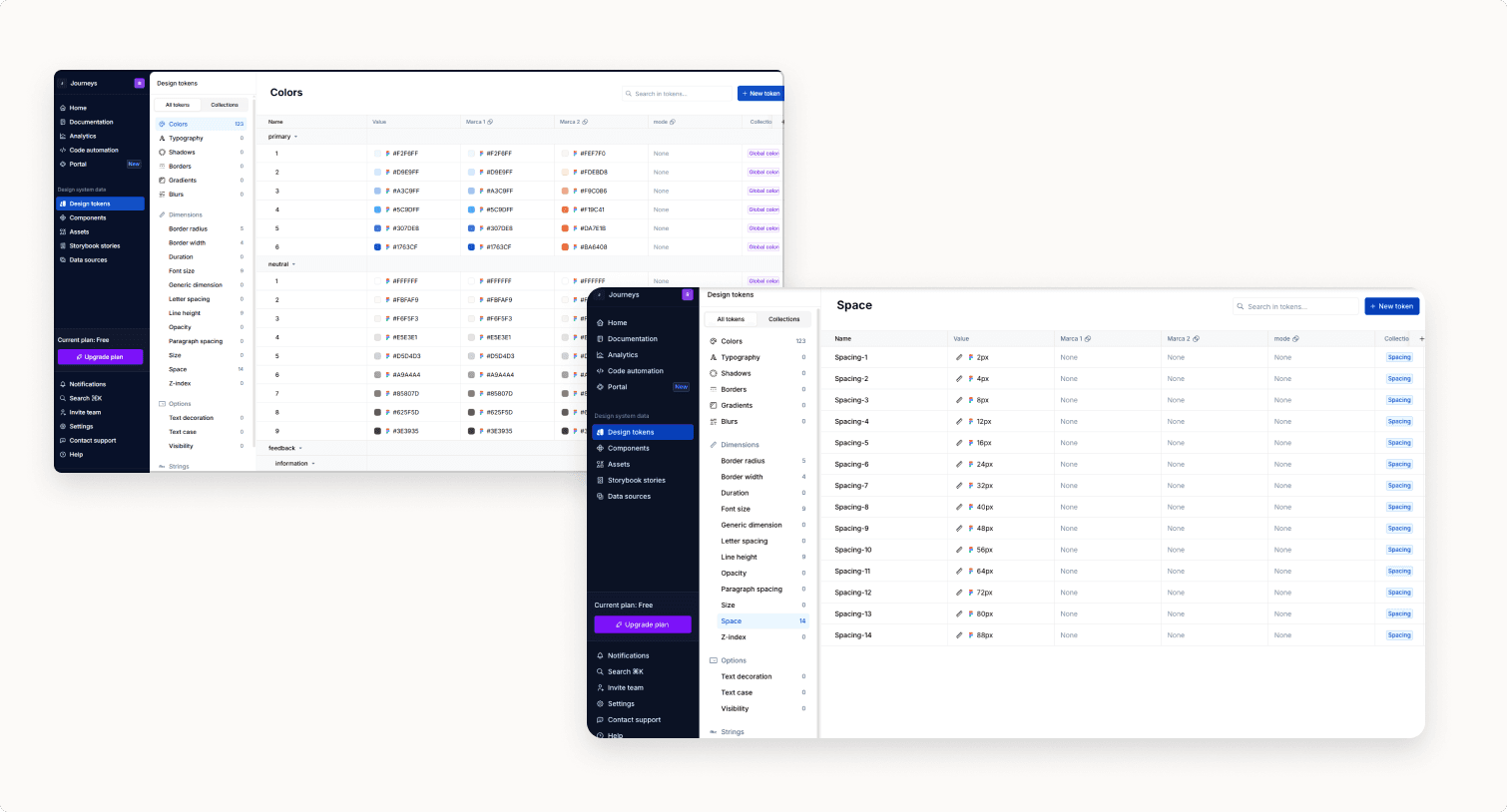
Documentation was developed in Supernova, allowing all information to be centralized in a clear and accessible way for the team. Each component includes its functional description, visual specifications, usage guidelines, and variants. The integration of direct links from Figma to Supernova facilitates the handoff to the development team, reducing errors and improving efficiency during implementation.
Documentation was developed in Supernova, allowing all information to be centralized in a clear and accessible way for the team. Each component includes its functional description, visual specifications, usage guidelines, and variants. The integration of direct links from Figma to Supernova facilitates the handoff to the development team, reducing errors and improving efficiency during implementation.
ADOPTION & GOVERNANCE
ADOPTION & GOVERNANCE
To ensure the effective implementation of the system, together with the team, we proposed an adoption strategy specifically designed for an environment where both design and development are executed by external teams. We organized training sessions and workshops to align technical criteria.
Additionally, we defined direct feedback channels so these teams could report inconsistencies or suggest improvements, with the objective of transforming the system into a living resource.
To ensure the effective implementation of the system, together with the team, we proposed an adoption strategy specifically designed for an environment where both design and development are executed by external teams. We organized training sessions and workshops to align technical criteria.
Additionally, we defined direct feedback channels so these teams could report inconsistencies or suggest improvements, with the objective of transforming the system into a living resource.
Get in touch
mail: ruizrocio.e@gmail.com
Get in touch
mail: ruizrocio.e@gmail.com